
Structured Data
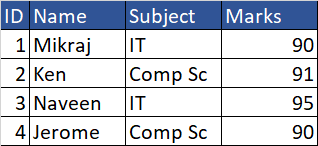
When data is stored in the form of tables and tables contain rows and columns. For example, If you store the data in any DBMS or RDBMS then it is structured data.
Student table:
Fields ID,Name,Subject,Marks
Records : 4 records
Unstructured Data
When data is not get stored in the form of Relational DataBase Management System then it is unstructured data for example images.
Semi-Structured Data
Semi-structured data is a form of structured data that does not obey the tabular structure of data models associated with relational databases or other forms of data tables, but nonetheless contains tags or other markers to separate semantic elements and enforce hierarchies of records and fields within the data. Therefore, it is also known as self-describing structure.
Example Json,XML
NoSql
A NoSQL (originally referring to "non-SQL" or "non-relational") database provides a mechanism for storage and retrieval of data that is modeled in means other than the tabular relations used in relational databases.
Examples MongoDB, DyanmoDB in AWS
DynamoDB
DynamoDB is a key-value and document database that can support tables of virtually any size with horizontal scaling. This enables DynamoDB to scale to more than 10 trillion requests per day with peaks greater than 20 million requests per second, over petabytes of storage.Serverless Solution (no EC2 instances needed, means this service is created implicitly).
Fast, flexible NoSQL database service for single-digit millisecond performance at any scale
DynamoDB global tables replicate your data automatically across your choice of AWS Regions and automatically scale capacity to accommodate your workloads.
Read/write capacity modes
On-Demand Capacity mode
For workloads that are less predictable for which you are unsure that you will have high utilization. (more chargeable in comparison to provisioned capacity mode)
Provisioned Capacity mode
Tables using provisioned capacity mode require you to set read and write capacity. Provisioned capacity mode is more cost-effective when you’re confident you’ll have decent utilization of the provisioned capacity you specify.
Change tracking with triggers
DynamoDB integrates with AWS Lambda to provide triggers. Using triggers, you can automatically execute a custom function when item-level changes in a DynamoDB table are detected.
Table Class
Table class to optimize your table's cost based on your workload requirements and data access patterns.
DynamoDB Standard
The default general-purpose table class. Recommended for the vast majority of tables that store frequently accessed data, with throughput (reads and writes) as the dominant table cost.
DynamoDB Standard-IA
Recommended for tables that store data that is infrequently accessed, with storage as the dominant table cost.


No comments:
Post a Comment