Showing posts with label dynamodb. Show all posts

Monday, March 21, 2022

AWS Compute + Database + Storage - Lambda + DynamoDB + S3 Bucket


Lambda with S3 Example

1. Configure security - Role

Create a DynomdbFullAccess Role and Assign to Lambda (NOT EC2!!).

             AmazonDynamoDBFullAccess

2. Configure a Lambda Function

Step 1: Create a Lambda function Func2 with Runtime as Python 3.6

Step 2: Write below code in the code window. (This code is written in python using Boto Library which has the functions to insert S3 object information into DynamoDB table).

import boto3

from uuid import uuid4

def lambda_handler(event, context):

    s3 = boto3.client("s3")

    dynamodb = boto3.resource('dynamodb')

    for record in event['Records']:

        bucket_name = record['s3']['bucket']['name']

        object_key = record['s3']['object']['key']

        size = record['s3']['object'].get('size', -1)

        event_name = record ['eventName']

        event_time = record['eventTime']

        dynamoTable = dynamodb.Table('newtable-irfan')

        dynamoTable.put_item(

            Item={'unique': str(uuid4()), 'Bucket': bucket_name, 'Object': object_key,'Size': size, 'Event': event_name, 'EventTime': event_time})

Step 3: File---> Save and Click on the Deploy button.

Step 4: Click on Configuration Tab and select Permission and click on Edit Role and attach the role which is created on Step1.

Step 5: Add Trigger by clicking on Add trigger button.

          Select S3 trigger

          Select bucket name (if you don't have a bucket, create a bucket first)

          Event Type: All objects create events

          Select acknowledgment for recursive invocation.

          Click on Add button

3. Initiate a DynamoDB Table

Step 1: Create a DynamoDB table newtable-irfan and partition key unique.

Step 2: Explore items in newtable-irfan and you will find no records for this table.

4. Monitor changes in DynamoDB when you upload something in S3 bucket

Step 1: Upload and file in S3 bucket.

Step 2: Explore items in the DynamoDB table. and you will find the metadata information of the uploaded file in the S3 bucket.


Experiment:

Notice that if you delete the file in S3 bucket, the data in dynamoDB will not be erased.

Why?

because the lambda function we provide is only doing the PUT method. if we want to delete from the dynamoDB, we need to make another method. BUT that will require the API GATEWAY!.

Wednesday, March 16, 2022

AWS Database - DynamoDB & Table Class (Serverless Database)


Structured Data

When data is stored in the form of tables and tables contain rows and columns. For example, If you store the data in any DBMS or RDBMS then it is structured data.

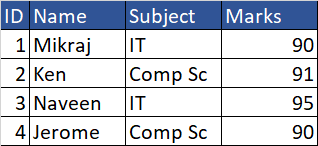
Student table: 

Fields ID,Name,Subject,Marks

Records : 4 records


Unstructured Data

When data is not get stored in the form of Relational DataBase Management System then it is unstructured data for example images.

Semi-Structured Data

Semi-structured data is a form of structured data that does not obey the tabular structure of data models associated with relational databases or other forms of data tables, but nonetheless contains tags or other markers to separate semantic elements and enforce hierarchies of records and fields within the data. Therefore, it is also known as self-describing structure.

Example Json,XML

NoSql

A NoSQL (originally referring to "non-SQL" or "non-relational") database provides a mechanism for storage and retrieval of data that is modeled in means other than the tabular relations used in relational databases.

Examples MongoDB, DyanmoDB in AWS


DynamoDB

DynamoDB is a key-value and document database that can support tables of virtually any size with horizontal scaling. This enables DynamoDB to scale to more than 10 trillion requests per day with peaks greater than 20 million requests per second, over petabytes of storage.

Serverless Solution (no EC2 instances needed, means this service is created implicitly).
With DynamoDB, there are no servers to provision, patch, or manage, and no software to install, maintain or operate. DynamoDB automatically scales tables to adjust for capacity and maintains performance with zero administration. Availability and fault tolerance are built-in, eliminating the need to architect your applications for these capabilities.

Fast, flexible NoSQL database service for single-digit millisecond performance at any scale

DynamoDB global tables replicate your data automatically across your choice of AWS Regions and automatically scale capacity to accommodate your workloads.

P/S: Although it is serverless, it just means that AWS will manage it themselves and they will create an instance in the background without you configuring anything!

Read/write capacity modes
On-Demand Capacity mode
For workloads that are less predictable for which you are unsure that you will have high utilization. (more chargeable in comparison to provisioned capacity mode)

Provisioned Capacity mode
Tables using provisioned capacity mode require you to set read and write capacity. Provisioned capacity mode is more cost-effective when you’re confident you’ll have decent utilization of the provisioned capacity you specify.

Auto-scaling
For tables using provisioned capacity, DynamoDB delivers automatic scaling (scale up or scale  down) of throughput and storage based on your previously set capacity by monitoring the performance usage of your application

Change tracking with triggers
DynamoDB integrates with AWS Lambda to provide triggers. Using triggers, you can automatically execute a custom function when item-level changes in a DynamoDB table are detected.

Table Class
Table class to optimize your table's cost based on your workload requirements and data access patterns.

DynamoDB Standard
The default general-purpose table class. Recommended for the vast majority of tables that store frequently accessed data, with throughput (reads and writes) as the dominant table cost.


DynamoDB Standard-IA
Recommended for tables that store data that is infrequently accessed, with storage as the dominant table cost.

Fluentd

Open-source log data collector > why logs? - for compliance (auditing, company, business) - for security (transparency, monitoring, admin...