
Beanstalk vs CloudFormation In a nutshell
The essential difference between these services is that Beanstalk handles deployment/provisioning for you while CloudFormation requires a lot of input.
So Beanstalk is low effort, low control, and Cloudformation, more effort more control.
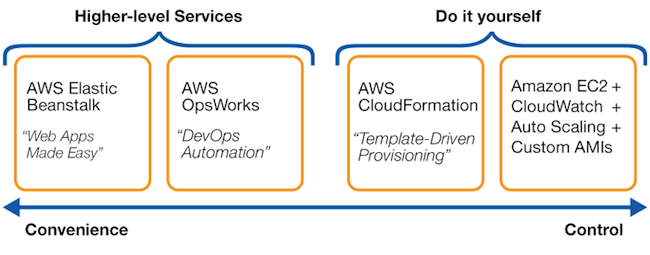
image credit: stackoverflow
How Beanstalk works
Beanstalk can be accessed via the AWS management console, line command, or API.
Language-wise it supports Go, Java, Node.js, PHP, Python, Ruby and Docker Containers and more.
It can be set-up without very much input at all, although users can specify EC2 instance types, and add additional resources such as RDS.
Once your application has been uploaded, Beanstalk will handle the following with sensible defaults:
- Provisioning
- Auto-scaling
- Load balancing
- And application health monitoring
Elastic Beanstalk allows you to fine-tune the details of any provisioned resources if you do want a bit more control.
And you can also add resources such as an SQS queue, CloudWatch alarms, and even an ElastiCache cluster, which can be configured through .ebextensions configuration files.
Plus, you can roll back to previous versions.
Pros
- Easy access to automation – the major draw of Beanstalk for most users: it runs your infrastructure with very little input required
- Cost – there’s no additional cost for Beanstalk itself, you just pay for the resources it provisions.
- Flexibility – you do have the option of managing any part of your Beanstalk stack manually, which isn’t the case for CloudFormation
Cons
- Not easy to diagnose problems – because it managed everything for you, finding out exactly where Beanstalk went wrong – in the case that it does – can require a lot of detective work
- Updates to stack – Beanstalk will makes changes to your stack inline with updates, and though in many cases this is totally benign, in some, it can cause issues
- Lack of fine control – although many of the default settings on a Beanstalk-deployed app are sensible, they won’t suit every use case
- Flexibility has limits – while you can deploy additional resources using .ebextensions, it tends to feel like you’re stretching Elastic Beanstalk beyond its intended use case.
How it works – CloudFormation
The user writes a YAML or Json template specifying the AWS services used.
Once uploaded, CloudFormation can then create and deploy the specified resources.
AWS resources collected together to run one application are known as a stack, and it’s possible to reuse your template to deploy that stack in multiple environments.
Pros
- Brings code review features to infra – because it’s IaC, you can now review your infra changes as you would code changes, allowing for greater oversight
- Granular control – the main benefit of CloudFormation is offering the experienced user granular control and oversight of their AWS stack
- Large community support – although it’s complex, CloudFormation is an established tool tool with a big community and resource base
Cons
- Front-loading on learning compared to Beanstalk – a ‘crash course’ in CloudFormation will leave you with gaping holes in your knowledge, which is all the more problematic because…
- User error can pose real risks – CloudFormation makes it easy for a small mistakes to have big impacts, and it’s common for users to accidentally delete entire services from their stacks
- CloudFormation drift – when working with CloudFormation, it is important that all changes are done through CloudFormation. Manual changes lead to drift, and when there is too much drift, the CloudFormation code will be unusable for future changes – meaning the benefits of IaC will be lost.
Use cases
Now we have an idea of how Beanstalk and CloudFormation work, we can see how each fits different use cases.
Beanstalk is good for
Beanstalk can be great for teams who – for whatever reason – don’t have the time or resources to invest in cloud.
It provides many of the benefits of a knowledgeable MSP – auto-scaling, etc – for free, and with minimal input on the part of the user.
It has some flexibility too, but it works excellently for teams with common application types.
So, it tends to suit:
- Small application-focussed teams
- Teams with a simple application like an e-commerce site
- Start-ups who want to get an MVP out quickly
CloudFormation is good for
CloudFormation is a powerful tool if you know how to use it and you need granular control over your AWS stack.
It’s not the easiest to use, but it opens up a lot of avenues for those who’ve mastered it.
It tends to suit:
- Teams with a lot of workloads who need a way of streamlining provisioning
- Teams with complex applications who need more control over their stacks
- Teams who need to manage their resources more closely for cost or security reasons
- Teams that have dedicated DevOps engineers to be the managers and gatekeepers of CloudFormation


No comments:
Post a Comment